
Quick verdict
The safest first pick for most laptop users is the Anker Laptop Power Bank 25K 165W because it solves two common problems at once: enough laptop-class output and fewer cable decisions. If size matters more, the Baseus 20,000mAh 100W is easier to justify. If runtime matters more, look at the INIU 27,000mAh 140W. If the setup includes several demanding USB-C devices, the Anker Prime 26K 300W is the premium option. If the laptop is lighter and portability matters, the Anker 20,000mAh 87W is the more sensible carry. If the main appeal is built-in cables, the UGREEN Nexode 25K 165W is the direct alternative to consider.
Before buying any of them, check whether the laptop charges over USB-C. If that part is unclear, start with the guide to checking laptop power bank compatibility. If the laptop already charges over USB-C, the next useful decision is whether a 65W or 100W power bank is enough.
Quick picks
Use these as shortcuts, not final answers. A power bank that is perfect for one laptop bag can be the wrong one for another.
For a narrower list focused only on 100W-class models, see the guide to 100W USB-C power banks.
Comparison table
The fastest way to narrow this list is to look at the job each product is trying to do. Do not start with the biggest number. Start with the problem: cable clutter, size, runtime, output, or premium multi-device charging.
| Ref | Product | Capacity | Max output | Best for |
|---|---|---|---|---|
| 1 | Anker Laptop Power Bank 25K 165W | 25,000mAh | 165W total | Best overall laptop power bank |
| 2 | Baseus 100W Power Bank 20,000mAh | 20,000mAh | 100W | Slimmer 100W laptop charging setup |
| 3 | INIU 140W Laptop Power Bank 27,000mAh | 27,000mAh | 140W | High-capacity laptop charging |
| 4 | Anker Prime Power Bank 26K 300W | 26,250mAh | 300W total | Premium high-output laptop and multi-device setups |
| 5 | Anker Power Bank 20,000mAh 87W | 20,000mAh | 87W total | Lighter laptop and travel carry |
| 6 | UGREEN Nexode Power Bank 25,000mAh 165W | 25,000mAh | 165W total | Built-in cable laptop charging |
How to choose without wasting money
Most bad power bank purchases happen for one reason: people buy battery capacity when the real problem is charging compatibility.
A laptop needs more than “a lot of mAh.” It needs the right USB-C charging support, enough wattage, and a cable that can carry that wattage. If one part of that chain is wrong, the result can be simple and frustrating: the power bank charges the phone, but the laptop does nothing.
Check these five things before buying:
- Does the laptop actually charge over USB-C?
- What wattage is printed on the original laptop charger?
- Can the power bank deliver that wattage from a USB-C port?
- Can the cable carry that wattage?
- Does output drop when multiple devices are connected?
If the laptop uses a barrel connector or a proprietary power adapter, a USB-C power bank may not solve the problem. If the charger says 65W, a lighter 65W-class or 100W-class power bank may be enough. If the charger says 100W, start with 100W or higher. If the laptop is a demanding workstation or creator machine, check the manufacturer’s charging requirements before assuming any portable battery will behave like the wall charger.
Capacity still matters, but it comes second. A 27,000mAh power bank usually gives more runtime than a 20,000mAh model, but it will also be larger. And rated capacity is not the same as usable laptop energy. Conversion losses, heat, and voltage changes all reduce what reaches the computer.
Built-in cables are useful, but they are not automatically better. They reduce clutter and make it harder to forget the important cable. The tradeoff is durability and flexibility. If a built-in cable wears out or does not fit the way the setup is used, it can become the weak point.
For flying, check Wh. Many laptop-focused power banks are built around common airline limits, but do not rely on marketing phrases alone. Check the Wh rating and the airline rules for the route.
Best overall
Anker Laptop Power Bank 25K 165W
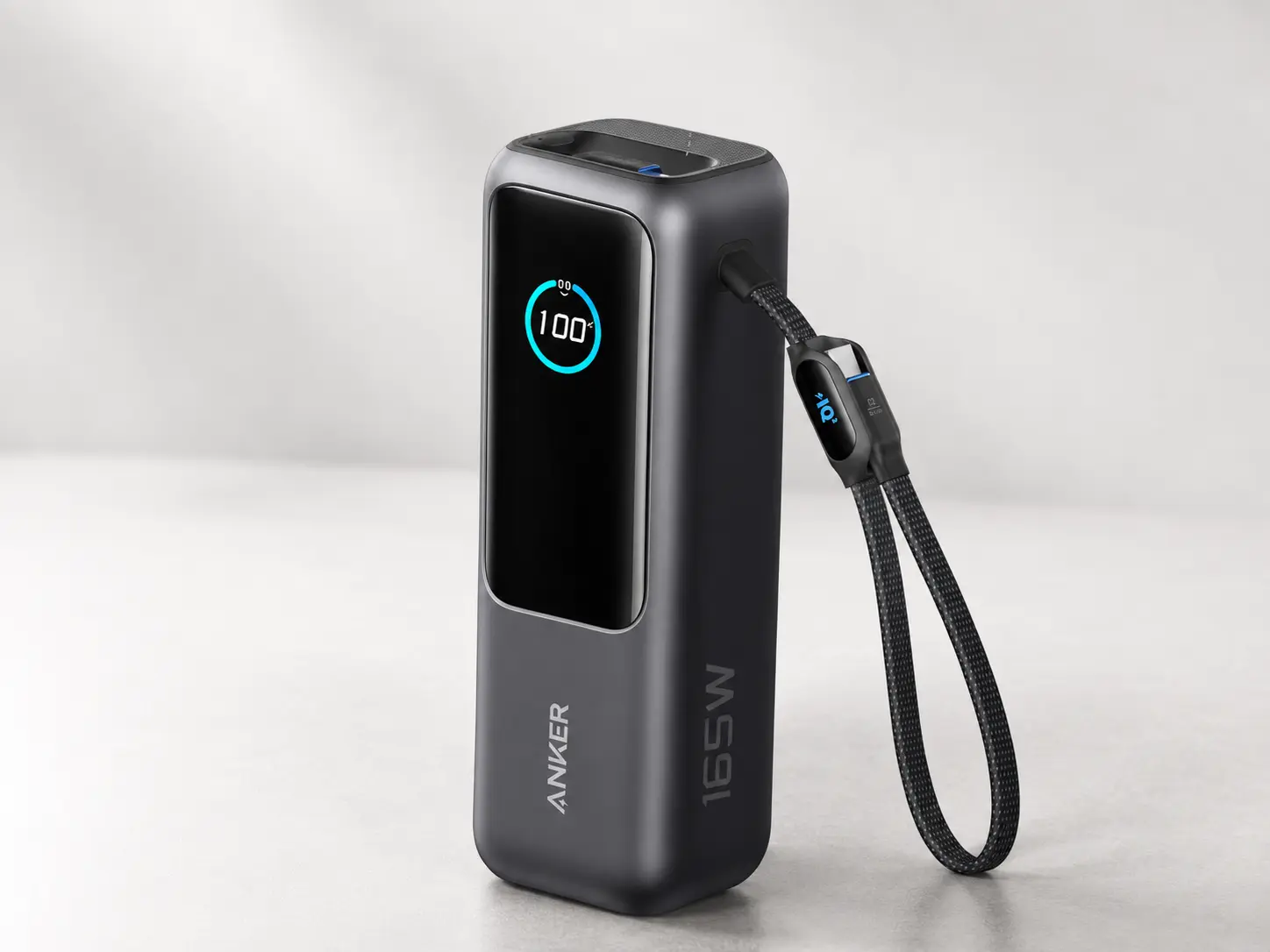
A strong all-round laptop power bank for USB-C charging, remote work, travel, and multi-device setups.
BrandAnker
Power
- Capacity
- 25,000mAh
- Max output
- 165W total
- USB-C output
- Triple 100W USB-C ports
Ports and cable
- Cable setup
- Built-in and retractable USB-C cable design
- Device support
- Listed for laptops, phones, tablets, and multi-device charging
- Cable note
- Built-in cables reduce cable clutter; confirm port behavior before buying.
Fit
- Best for
- USB-C laptop users who want one strong all-round power bank
- Not ideal for
- Phone-only users or laptops that do not support USB-C charging
- Travel note
- 100Wh airline compliance noted; travelers should still check airline rules before flying.
Pros
- Strong laptop-focused USB-C output class
- Built-in and retractable USB-C cables reduce cable clutter
- Good fit for remote work, travel, and multi-device charging
Cons
- More power than phone-only users need
- Confirm shared-output behavior before buying
- Still requires a laptop that supports USB-C charging
The Anker 25K is the easiest recommendation to explain: it is the pick for people who want fewer moving parts. Many laptop power banks still assume the right USB-C cable is already in the bag. This one is more interesting because the built-in and retractable cable setup reduces that problem.
That does not make it small. This is not a pocket battery for casual phone top-ups. It is a serious laptop-focused pack for people who work from cafés, airports, shared offices, hotel rooms, or anywhere the outlet situation is uncertain.
Choose it if cable management matters and the laptop supports USB-C charging. Skip it if weight matters more than convenience, or if the only real need is emergency phone charging.
The main things to check in recent Amazon reviews are cable durability, real carry weight, heat, and whether users mention output drops when charging multiple devices at once.
Best slim 100W option
Baseus 100W Power Bank 20,000mAh
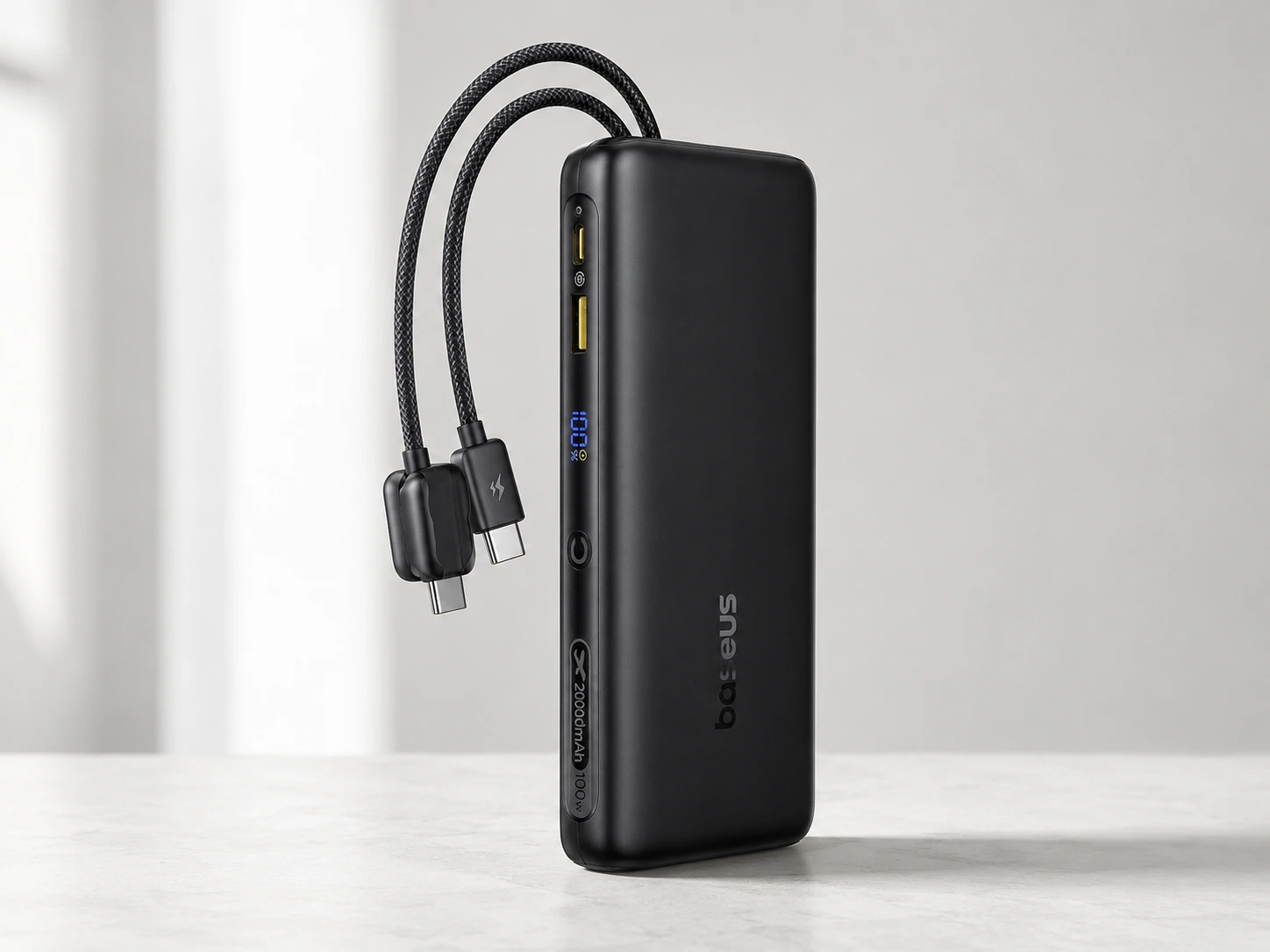
A practical 100W-class option for laptop users who want a smaller 20,000mAh power bank instead of a larger 25K–27K model.
BrandBaseus
Power
- Capacity
- 20,000mAh
- Max output
- 100W
- Output class
- Better suited for many 65W–100W USB-C laptop setups than basic phone power banks
Ports and cable
- Cable setup
- Built-in dual USB-C cables
- Cable note
- Useful for reducing cable clutter, but laptop charging still depends on USB-C PD compatibility.
Fit
- Best for
- Users who want a more compact 100W-class laptop power bank
- Not ideal for
- Users who need the largest possible capacity or sustained high-output workstation charging
Pros
- Practical 100W output class for many USB-C laptops
- 20,000mAh capacity keeps it more manageable than larger 25K–27K models
- Built-in cable design can be convenient for travel
Cons
- Less capacity than 25,000mAh and 27,000mAh options
- May not be ideal for heavier laptops that expect more sustained high wattage
- Confirm port behavior before buying
The Baseus 20,000mAh 100W is the practical middle ground. It is not trying to be the biggest battery here. Its job is simpler: give many USB-C laptop users a 100W-class option that is easier to carry than a 25K or 27K pack.
That makes it better for commuting, short trips, coffee-shop work, and people who mostly need top-ups rather than a full off-grid day. The built-in cable setup also helps if the goal is fewer loose accessories.
The compromise is runtime. A 20,000mAh battery can be enough for lighter laptop use, but it is not the one to choose if the laptop regularly drains fast and outlets are unavailable for long stretches.
Choose it if portability and 100W-class charging are the priority. Skip it if the goal is maximum reserve capacity.
Before buying, check reviews for cable durability, heat, and whether buyers with laptops similar to yours report stable charging.
Best high-capacity option
INIU 140W Laptop Power Bank 27,000mAh
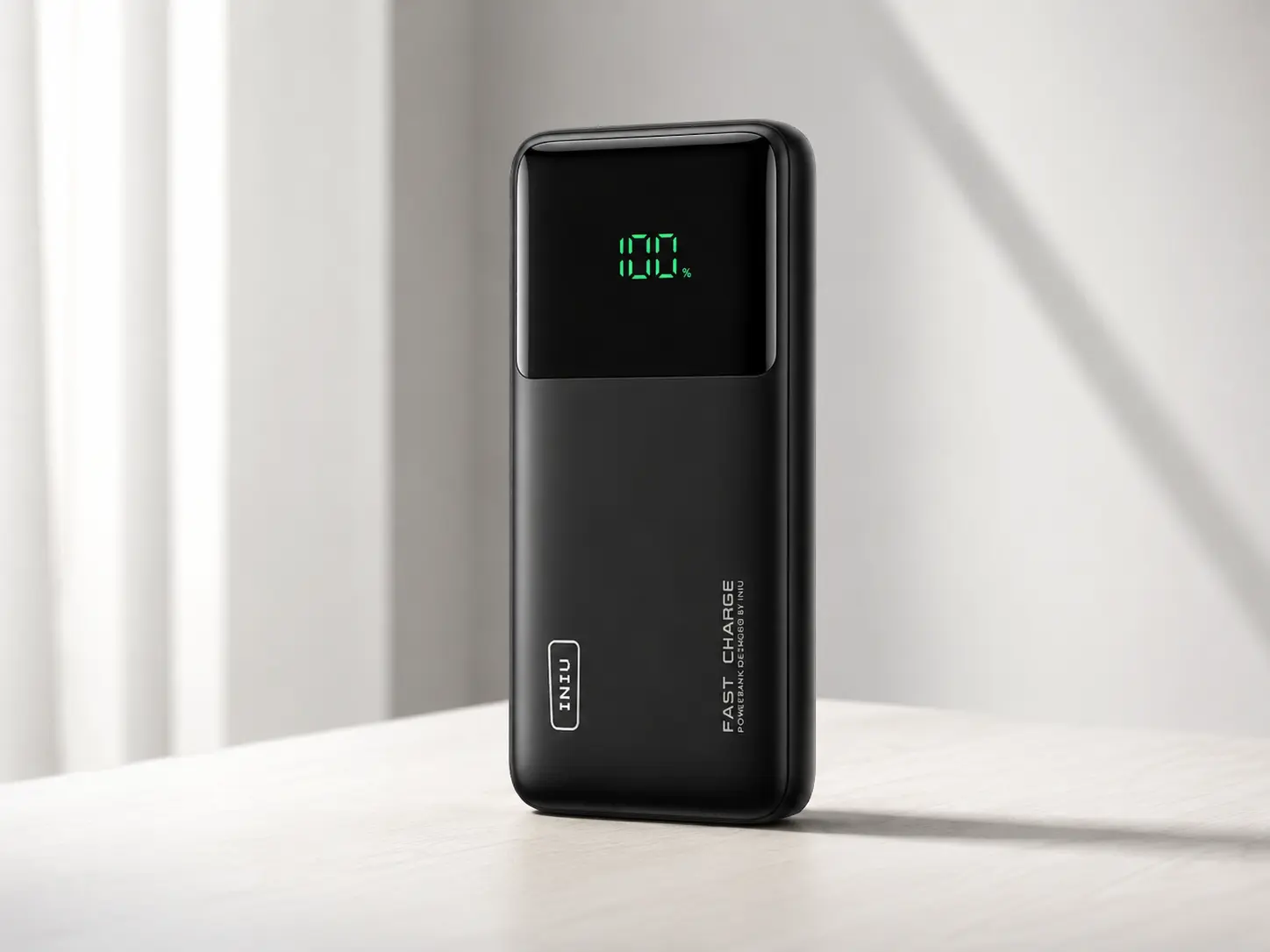
A larger high-output option for laptop users who want more capacity and more charging headroom than a smaller 20,000mAh power bank.
BrandINIU
Power
- Capacity
- 27,000mAh
- Max output
- 140W
- Output class
- High-output class for laptops, tablets, and travel setups
Ports and cable
- Ports
- 3 ports
- Cable note
- Use a high-wattage USB-C cable that matches the power bank and laptop charging requirements.
Fit
- Best for
- Laptop users who want a larger high-capacity power bank
- Not ideal for
- Users who want the smallest possible everyday carry option
- Travel note
- Check the Wh rating and airline rules before flying.
Pros
- Large 27,000mAh capacity class
- High 140W output class
- Good candidate for laptop plus tablet or phone travel setups
Cons
- Larger and heavier than smaller 20,000mAh options
- Overkill for phone-only backup
- Travel rules and Wh rating should be checked before flying
The INIU 27,000mAh 140W is the pick for people who think in hours away from outlets, not just emergency top-ups. It belongs here because it combines a larger capacity class with high-output USB-C charging.
This is the one to consider if the setup includes a laptop, phone, tablet, handheld console, or several USB-C devices that may need power during the same day. It is less appealing if the main goal is a light everyday carry.
The tradeoff is obvious: larger capacity means more to carry. That is not a flaw if the extra reserve is needed. It is a problem if the power bank ends up staying at home because it feels too big for the bag.
Choose it if runtime matters more than compact size. Skip it if the laptop only needs occasional short top-ups.
Before buying, check reviews for weight, display usefulness, heat, and how the battery behaves when two or three devices are connected.
Best premium high-output setup
Anker Prime Power Bank 26K 300W
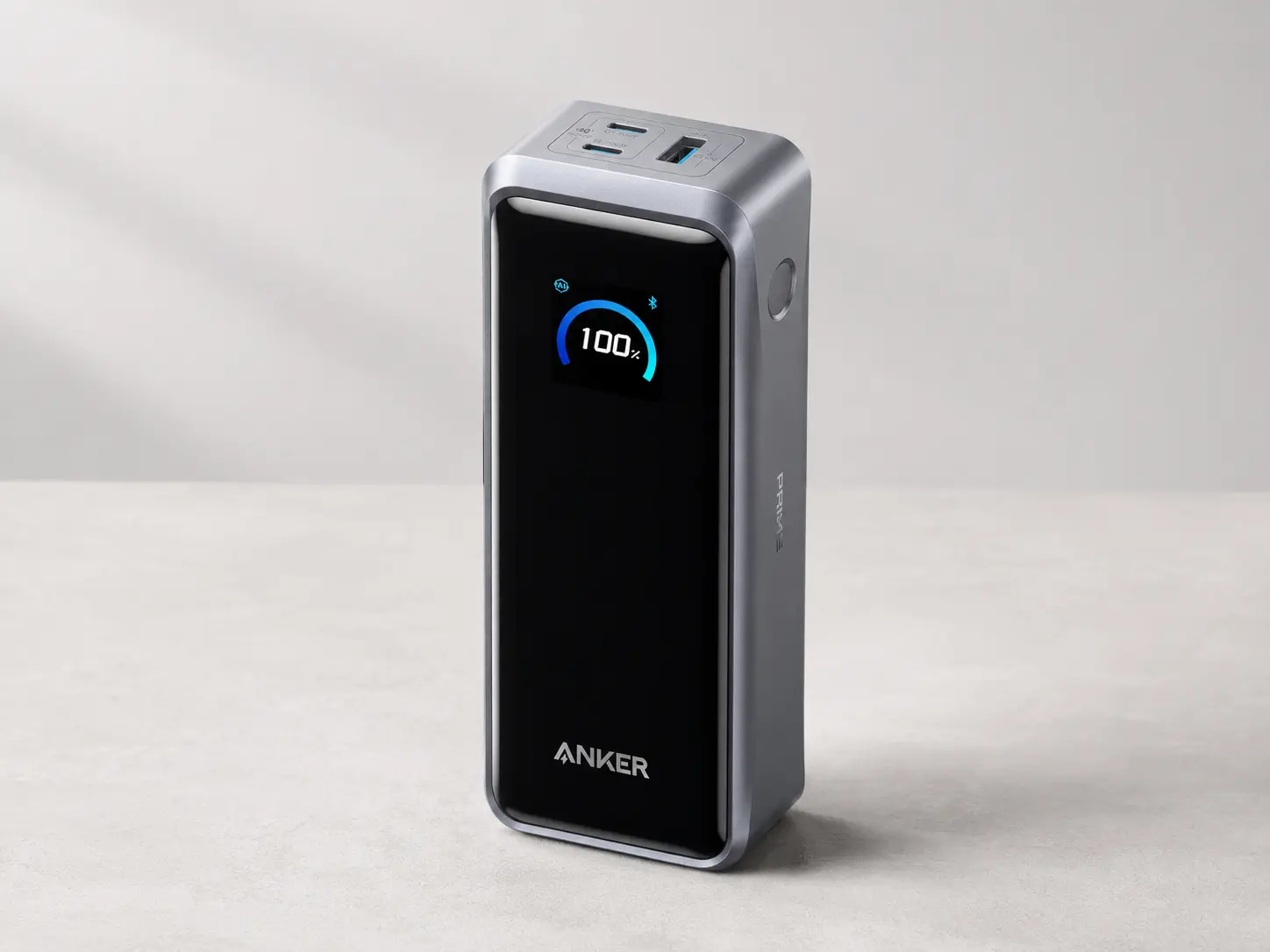
A premium high-output option for users who want more total power for laptop-heavy and multi-device charging setups.
BrandAnker
Power
- Capacity
- 26,250mAh
- Max output
- 300W total
- Charging type
- Two-way charging support
Ports and workflow
- Ports
- 3-port portable charger
- App control
- App control support
- Base note
- Base not included for this version.
Fit
- Best for
- Creators, desk setups, laptop-heavy workflows, and multi-device charging
- Not ideal for
- Users who only need a simple travel power bank for occasional laptop top-ups
Pros
- Very high total output class
- Strong fit for multi-device laptop setups
- Premium option for desk and travel workflows
Cons
- More expensive and more complex than a basic laptop power bank
- Overkill for users who only need emergency laptop charging
- Confirm current per-port and shared-output behavior before buying
The Anker Prime 26K 300W is not the normal travel pick. It is closer to a compact charging hub that happens to be portable.
Most people do not need this much total output. That is exactly why it should not be the default choice. It makes sense when the setup includes a laptop plus other power-hungry gear, and the power bank should not become the bottleneck.
This is the option for people who move between desk, travel bag, and temporary workspaces with multiple devices. It is less sensible for someone who only wants to keep a laptop alive for a meeting or two.
Choose it if premium output and multi-device charging matter. Skip it if a simpler 100W or 165W battery already solves the problem.
Before buying, check whether the version includes the accessories expected, how app control is used, how hot it gets under load, and whether the total output matches the devices in the actual setup.
Best lighter option
Anker Power Bank 20,000mAh 87W
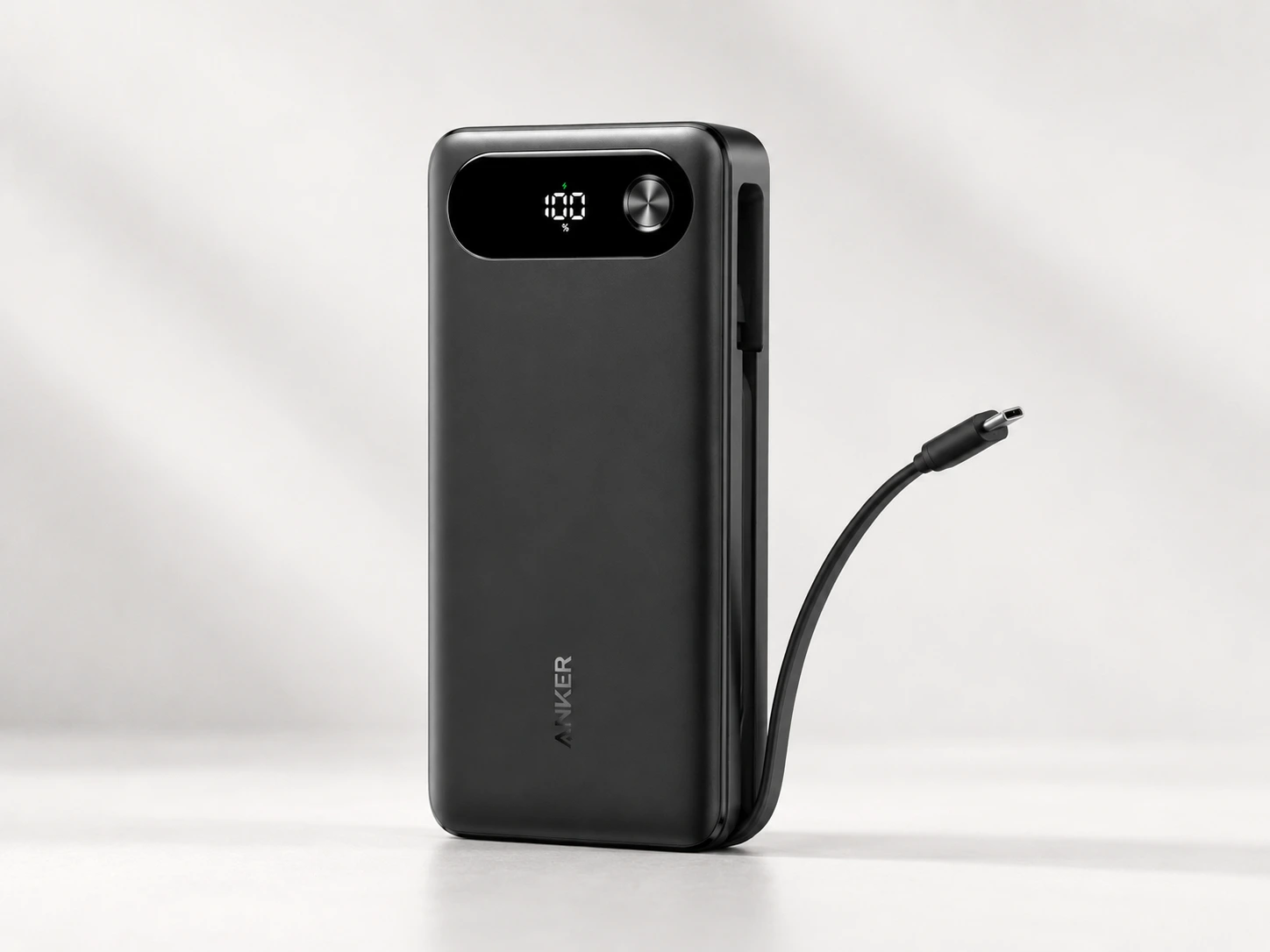
A lighter 20,000mAh option for users who want a more compact setup for USB-C laptops, phones, tablets, and travel bags.
BrandAnker
Power
- Capacity
- 20,000mAh
- Max output
- 87W total
- Single-device output
- Up to 65W
Ports and cable
- Cable setup
- Built-in USB-C cable
- Port layout
- 3-port design
Fit
- Best for
- MacBook Air-class laptops, phones, tablets, and lighter travel setups
- Not ideal for
- High-power workstation laptops that expect 90W–100W or more
Pros
- More compact capacity class than 25K–27K models
- Good fit for lighter USB-C laptops and mixed phone/laptop carry
- Built-in USB-C cable reduces cable clutter
Cons
- Single-device laptop output is lower than 100W+ options
- Not ideal for heavier laptops that expect higher wattage
- Less capacity than larger laptop-focused power banks
The Anker 20,000mAh 87W is not here to win a spec-sheet fight. It is here because many people are better served by the power bank they actually carry.
For lighter USB-C laptops, tablets, phones, and travel bags, this can make more sense than a larger battery with bigger headline numbers. The built-in USB-C cable keeps the setup simple, and the smaller capacity class makes it easier to bring along.
The limit is output. If the laptop expects 90W, 100W, or more, this is not the strongest option. It is better for MacBook Air-class laptops and lower-wattage USB-C machines than for power-hungry workstations.
Choose it if carry weight matters and the laptop does not need more than this output class. Skip it if maximum charging speed is the priority.
Before buying, check reviews from people using similar laptops, especially around single-device output, cable durability, and heat.
Best built-in cable alternative
UGREEN Nexode Power Bank 25,000mAh 165W
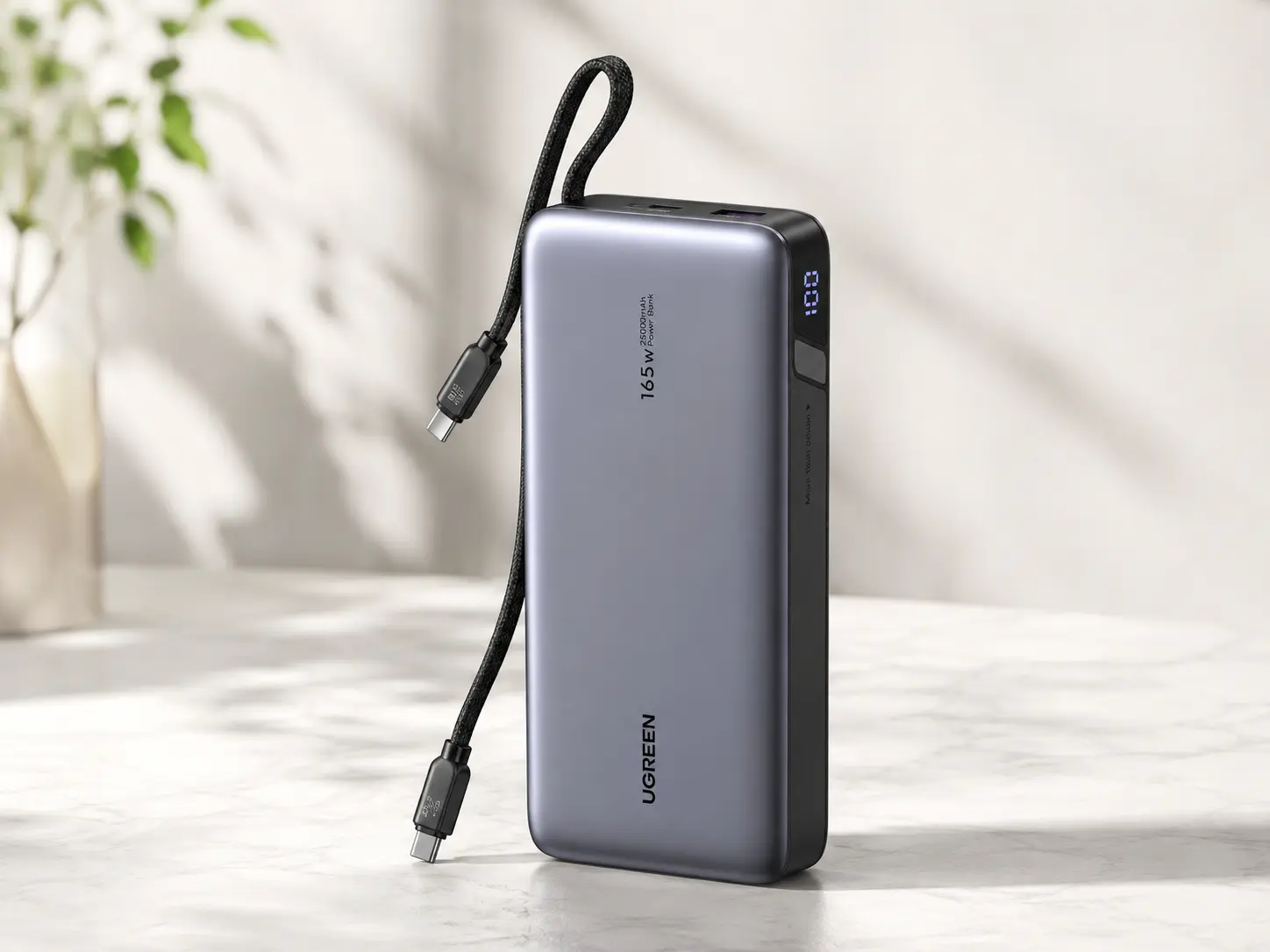
A strong UGREEN alternative for laptop users who want a 25,000mAh power bank with built-in USB-C cables and high-output charging headroom.
BrandUGREEN
Power
- Capacity
- 25,000mAh
- Rated energy
- 90Wh
- Max output
- 165W total
- Single-port USB-C output
- Up to 140W
Ports and cable
- Cable setup
- Two built-in USB-C cables
- Port layout
- Check current product page for exact cable/output details
- Cable note
- Built-in cables reduce cable clutter, but a separate compatible cable may still be useful as backup.
Fit
- Best for
- Laptop users who want a high-output UGREEN option with built-in cables
- Compatibility note
- Best for USB-C charging laptops, tablets, and phones. Not useful for laptops that do not accept USB-C PD charging.
- Travel note
- 90Wh is below the common 100Wh airline battery threshold, but airline rules should still be checked before flying.
Pros
- Strong 165W total output class
- Built-in dual USB-C cables reduce cable clutter
- 90Wh capacity class stays below the common 100Wh airline battery threshold
Cons
- Still requires a laptop that supports USB-C charging
- Built-in cables are convenient but less flexible if a cable wears out
- Confirm shared-output behavior before buying
The UGREEN Nexode 25K 165W is for people who like the Anker-style idea but want a different built-in-cable option. Its value is not only the output number. Its value is a cleaner bag: fewer loose cables, fewer forgotten accessories, and one battery that is ready to plug in.
That convenience has a tradeoff. Built-in cables are great until cable durability becomes the concern. If the cable setup works well, it is cleaner than carrying separate cables. If it does not, a power bank with fully replaceable cables may age better.
The 90Wh rating also makes it interesting for travel-focused buyers, but the airline rules still need to be checked before flying.
Choose it if built-in cables are a real advantage for the way the power bank will be used. Skip it if replaceable external cables are more important.
Before buying, check reviews for cable durability, output split, heat, and whether laptop users with similar devices report stable charging.
Common buying mistakes
The first mistake is buying by mAh only. Capacity matters, but wattage decides whether the laptop actually charges.
The second mistake is ignoring the cable. A weak cable can turn a strong power bank into a slow charger.
The third mistake is believing the total output number without checking per-port output. A 165W or 300W total rating does not always mean the laptop gets that full number when other devices are connected.
The fourth mistake is assuming every USB-C port on a laptop accepts charging. Some USB-C ports are for data or display. Some laptops still need a proprietary charger.
The fifth mistake is buying the biggest battery when the better answer is a smaller one that will actually be carried.
Avoid these mistakes:
- Choosing by mAh only.
- Ignoring USB-C PD wattage.
- Using a cable that is not rated for the needed wattage.
- Expecting full laptop output while charging several devices.
- Assuming every USB-C laptop behaves the same.
- Assuming every high-capacity power bank is automatically travel-ready.
Who should not buy a laptop power bank
Do not buy a laptop power bank if the only problem is phone battery life. A smaller phone-focused battery will be cheaper, lighter, and easier to carry.
Do not buy one if the laptop does not charge over USB-C. A bigger battery will not fix the wrong charging port.
Do not buy one if the real goal is outage backup for a whole desk. If the setup includes a router, monitor, lamp, and laptop, a small portable power station may be the better tool.
Do not buy the biggest option just because it looks safest. The right pick is the one that matches the charger wattage, cable setup, travel needs, and actual devices.
How to read Amazon reviews before buying
For laptop power banks, the average star rating is not enough. Look for the boring details. They matter more.
Check reviews for:
- cable durability;
- heat during laptop charging;
- real carry weight;
- charging speed with actual laptops;
- behavior when several devices are plugged in;
- whether built-in cables feel solid;
- repeated failure patterns after weeks or months.
Built-in cables deserve extra attention. They are convenient, but they also become part of the product’s durability. If many people complain about the same cable issue, that matters.
Do not let one dramatic review decide everything. Look for patterns. Repeated complaints are more useful than one angry comment. Repeated praise from people using similar laptops is more useful than generic “works great” reviews.
FAQ
Can any power bank charge a laptop?
No. The laptop, power bank, and USB-C cable all need compatible charging support and enough wattage. A phone-focused power bank may not charge a laptop even if it has a large mAh number.
Is 20,000mAh enough for a laptop?
It can be enough for lighter USB-C laptops and short top-ups. For longer work sessions away from outlets, a 25,000mAh or 27,000mAh power bank usually gives more room, but it will also be larger.
Is 100W enough for a laptop?
For many USB-C laptops, 100W is a strong target. Smaller laptops may need less. Heavier laptops may need more. Check the wattage on the original charger first.
Is 140W or 165W better than 100W?
Only if the laptop and cable can use it. Higher output gives more room for demanding laptops and multi-device charging, but it does not help much if the laptop is limited to lower charging speeds.
Can I bring a laptop power bank on a plane?
Often yes, but check the Wh rating and the airline rules. Do not rely only on marketing phrases like travel-friendly or TSA-approved.
Why does my power bank charge my phone but not my laptop?
The usual causes are low USB-C PD output, the wrong cable, shared-output limits, or a laptop that does not support USB-C charging.
Do I need a special USB-C cable?
For 100W and higher charging, the cable can be the bottleneck. Use a cable rated for the wattage the laptop and power bank require.